Schedulers Overview
Schedulers let you automate backups on a recurring basis. Instead of manually triggering backups, configure a scheduler and GitSec will handle the rest.
Scheduler Types
GitSec offers four schedule types:
| Type | Description |
|---|---|
| Daily | Runs once per day at a specified time. |
| Weekly | Runs on one or more selected days of the week at a specified time. |
| Monthly | Runs once per month on a specified day and time. |
| Custom (CRON) | Runs on a fully customizable schedule defined by a CRON expression. |
Timezones
For Daily, Weekly, and Monthly schedulers, you select the timezone the schedule runs in:
- UTC
- Eastern Time (ET):
America/New_York - Local (Istanbul):
Europe/Istanbul
The timezone selector is not shown when Custom (CRON) is selected, the CRON expression defines the schedule on its own.
Global Schedulers Page
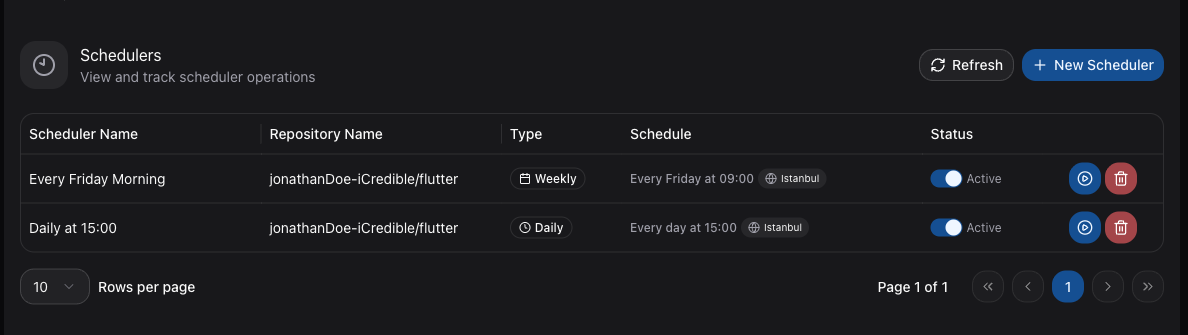
Navigate to Schedulers in the sidebar to view all schedulers across your repositories. Click New Scheduler to create a scheduler directly from this page. The table shows:
| Column | Description |
|---|---|
| Scheduler Name | The scheduler label. |
| Repository Name | The repository this scheduler is configured for. |
| Type | Daily, Weekly, Monthly, or Cron. |
| Schedule | A summary of when the scheduler runs, with a timezone badge. |
| Status | Active or Inactive, shown next to the enable/disable switch. |
Row Actions
Each row in the schedulers table provides three actions:
- Enable/disable switch: Toggle the scheduler between Active and Inactive without deleting it.
- Backup Now: Run the schedule immediately, without waiting for the next scheduled time. The backup uses the scopes configured on the scheduler.
- Delete: Permanently remove the scheduler. A confirmation dialog appears before anything is deleted.
Active vs. Inactive
Each scheduler has a switch to enable or disable it:
- Active: The scheduler will trigger backups at the configured time.
- Inactive: The scheduler is paused and will not trigger any backups until re-enabled.
This lets you temporarily pause automated backups without deleting the scheduler configuration.
Per-Repository Schedulers
You can also view and manage schedulers from the Scheduler tab on any repository detail page. This shows only the schedulers configured for that specific repository.